Your Oracle database connection is usually defined on your local machine, in the settings files for your tools such as SQL Developer (VS code or Classic), SQLcl, etc.
But in the ‘cloud’ – you can also define a Connection resource in our Database Tools developer service in OCI.
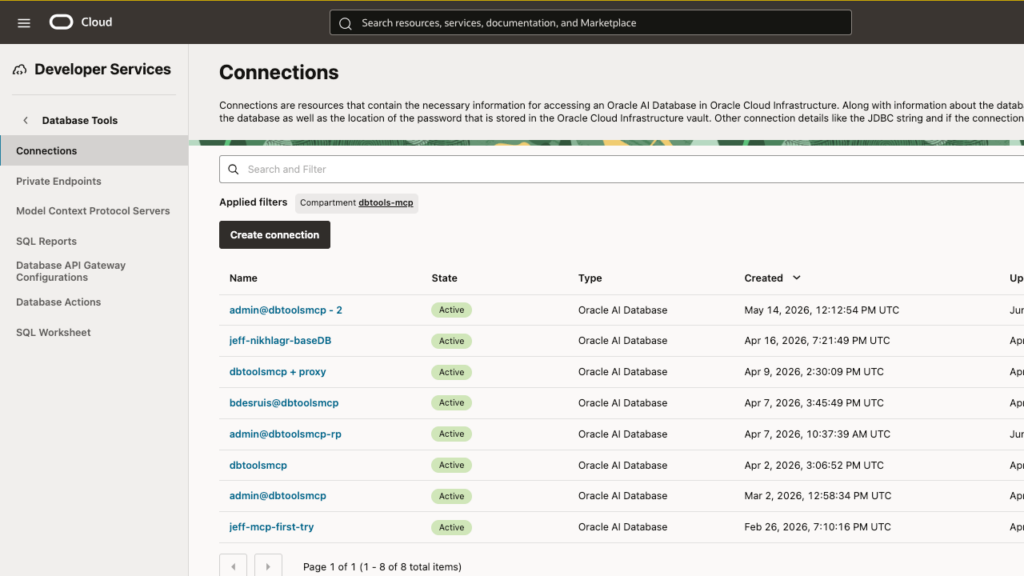
This connection empowers three things, mainly –
- SQL Developer Web – in the OCI Console, you can run queries, manage users, check for performance issues, etc (blog | docs)
- MCP Servers – connect your Agent with a cloud-based Oracle database, and use our MCP Tool (blog | docs)
- Runtime support – use our OCI Service endpoint to do things like… run SQL over your connection via REST/CLI (blog | docs)
Runtime support is still new and deserves special attention. I can use the infrastructure in our Database Tools Service to execute queries via REST (or CLI), using connection resources in my cloud lease – NO ORDS or SQLcl required.

I suspect most of these ideas will be new to many of you, but I wanted to take a minute today to talk about the FOURTH USE CASE.
Local application/tool connection to your OCI database
What if instead of getting the username, password, and TNS string for a Base VM, Exadata CS, or Autonomous Serverless (ADB-S) database, you only needed to refer to one OCID?
SQL> connect ocid1.databasetoolsconnection.oc1.phx.abcdefghijilmnopqrstuvwxyz.123
Connected.Wow.
What is OCID for?
That OCID represents a database connection that I have defined in my Database Tools console.
In the console, I can click and see how the connection is defined, and even use it to get a SQL Worksheet and start querying my database.
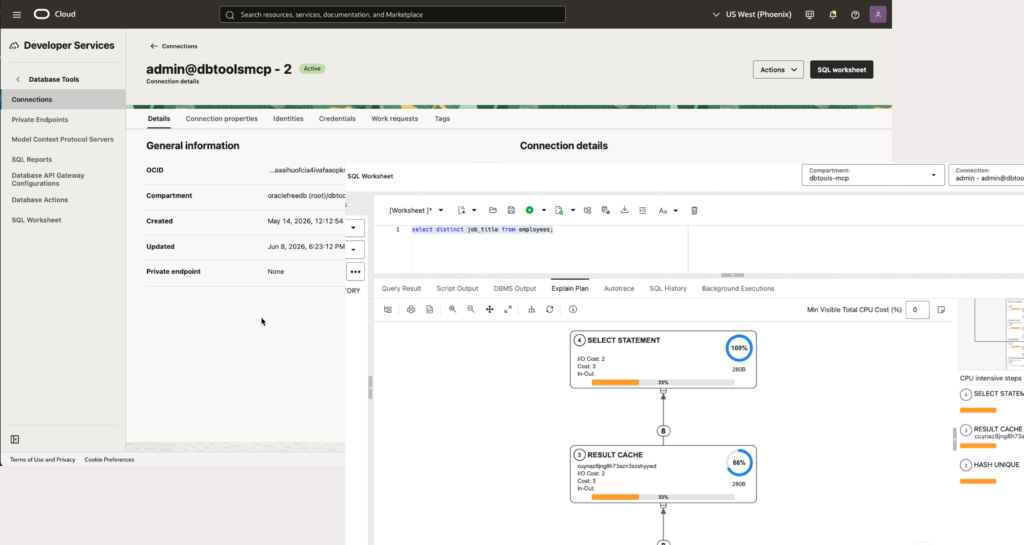
So now in SQLcl, I can refer to the OCID for this connection called ‘admin@dbtoolsmcp -2’, and SQLcl can use the OCI Profile on my machine to pull up everything it needs to create the database connection.
If I ask to see connection details, via ‘show connections’ –
SQL> show connection
COMMAND_PROPERTIES:
 type: OCI
CONNECTION:
 ADMIN@jdbc:oracle:thin:@(description= (retry_count=20)(retry_delay=3)(address=(protocol=tcps)(port=1522)(host=adb.us-phoenix-1.oraclecloud.com))(connect_data=(service_name=abcd123_dbtoolsmcp_low.adb.oraclecloud.com))(security=(ssl_server_dn_match=yes)))
CONNECTION_IDENTIFIER:
 ABCD123_DBTOOLSMCP_low
CONNECTION_DB_VERSION:
 Oracle Database 19c Enterprise Edition Release 19.0.0.0.0 - Production
 Version 19.31.0.1.0
NOLOG:
 false
PRELIMAUTH:
falseBut Jeff, do I have to memorize my OCID connections now?
No. You can save your connection via a name, and simply use that name in the future.
SQL> connect -save OCI_DBTOOLS_19c_ADB_PHX
Name: OCI_DBTOOLS_19c_ADB_PHX
OCID: ocid1.databasetoolsconnection.oc1.phx.abcderghijklmnopqrstuvwxyz_123
Type: ORACLE
Username: admin
Connection String: (description= (retry_count=20)(retry_delay=3)(address=(protocol=tcps)(port=1522)(host=adb.us-phoenix-1.oraclecloud.com))(connect_data=(service_name=yplnoxgbze43wl9_dbtoolsmcp_low.adb.oraclecloud.com))(security=(ssl_server_dn_match=yes)))
SQL> disconnect
Disconnected from Oracle Database 19c Enterprise Edition Release 19.0.0.0.0 - Production
Version 19.31.0.1.0
SQL> conn -name OCI_DBTOOLS_19c_ADB_PHX
Connected.
SQL>How to set it
Very easy, on Mac, I just (Document) –
brew install oci-cliAnd then I can use the oci setup command.
oci setup configAnswer the question.
Once complete, you will upload your public pem key to your OCI Console User’s ‘Tokens and Keys’ page.
How about using this via VS Code?
Good question! I hope to show you how to do this with a few points and clicks, VERY SOON.
The post How to connect to OCI Oracle Database via SQLcl first appeared on ThatJeffSmith.
PakarPBN
A Private Blog Network (PBN) is a collection of websites that are controlled by a single individual or organization and used primarily to build backlinks to a “money site” in order to influence its ranking in search engines such as Google. The core idea behind a PBN is based on the importance of backlinks in Google’s ranking algorithm. Since Google views backlinks as signals of authority and trust, some website owners attempt to artificially create these signals through a controlled network of sites.
In a typical PBN setup, the owner acquires expired or aged domains that already have existing authority, backlinks, and history. These domains are rebuilt with new content and hosted separately, often using different IP addresses, hosting providers, themes, and ownership details to make them appear unrelated. Within the content published on these sites, links are strategically placed that point to the main website the owner wants to rank higher. By doing this, the owner attempts to pass link equity (also known as “link juice”) from the PBN sites to the target website.
The purpose of a PBN is to give the impression that the target website is naturally earning links from multiple independent sources. If done effectively, this can temporarily improve keyword rankings, increase organic visibility, and drive more traffic from search results.
Comments are closed, but trackbacks and pingbacks are open.